


If you’re running eCommerce campaigns through Google Performance Max (PMAX) and using Shopping feeds, you’ll know that while automation is powerful, it still needs direction. At Q Social Media, we regularly manage and optimise PMAX Shopping campaigns for businesses, and the difference between ‘letting it run’ and actively refining it can be significant. We’ve put together our three top optimisation tips to help increase conversions, improve return on Ad spend (ROAS), and reduce wasted spend.
1. Optimise your audience signals
PMAX is Google’s first fully automated campaign type, designed to help you access all of Google’s ad inventory, including Search, Display, YouTube, Gmail and Maps within a single campaign. To make this work, you provide ‘asset groups’ (such as product images, videos, and headlines), but the most critical component is the Audience Signal. While automation is doing the heavy lifting, it relies on these signals to guide its learning phase and find the right users at the right time.
Defining a specific audience is a relatively new shift for Google. Previously, the focus was almost entirely on search terms or targeting based on the types of websites a user visited. Now, Audience Signals tell Google exactly which groups you want to prioritise. You can target people using criteria such as:
- Demographics & interests – Targeting specific age ranges or long-term hobbies, such as gardening or outdoor furniture
- Intent & search history – Reaching people based on the specific keywords they use or the types of searches they have already performed
- Competitor insights – Finding users who have visited similar product pages on competitor websites
- Life Events – Catching customers during major milestones like an upcoming wedding, anniversary, or birthday
To optimise properly, you should ensure you are using your own first-party data wherever possible. Two of the most powerful tools for this are:
- Customer Match Lists – You securely upload your own database of customer email addresses to Google. This allows the AI to find your existing customers across Google’s network and, more importantly, identify similar segments of new users who share their buying habits
- Website converters – These are high-value audiences of people who have already completed an action on your site, such as making a purchase or filling out a form. By tracking these via GA4 and layering them into your signals, you tell Google exactly what a ‘successful’ customer looks like
The stronger and more aligned your signals are to your actual customer base, the faster Google’s machine learning can identify similar users likely to convert. You can further refine these signals by layering in demographics, interests, or even major life events to help AI hunt for new users with the same high intent.
2. Review search queries & build a negative keyword list
For a long time, advertisers couldn’t see the search queries driving clicks from PMAX campaigns, but over the last year, Google enabled visibility of this data, and it has been a game changer. Reviewing search queries allows you to identify irrelevant searches, improve your click-through rates (CTR), and lower your cost per click (CPC).
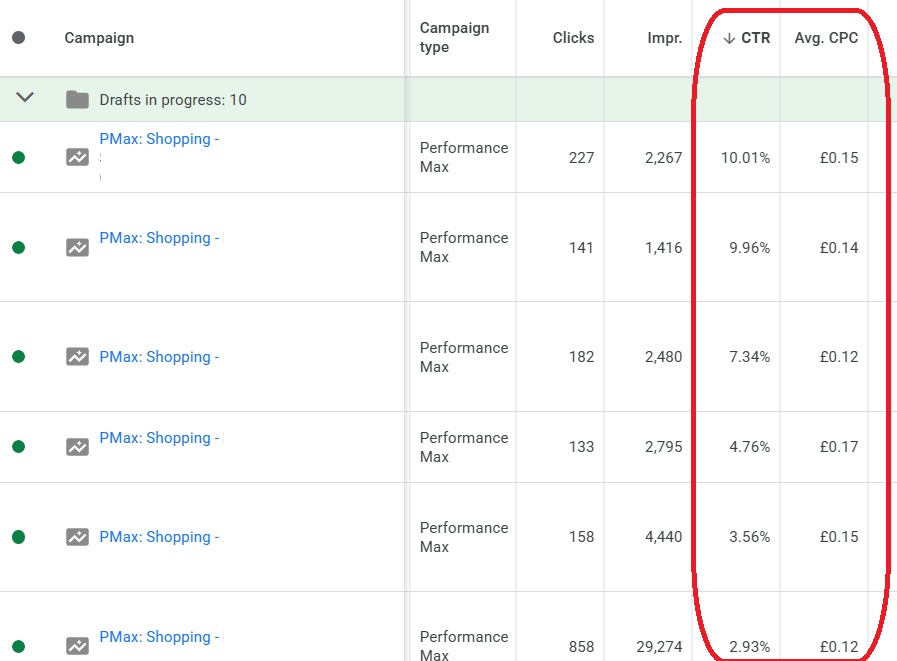
At Q Social Meida we regularly review search query data against conversion performance to add negative keywords, removing traffic unlikely to convert. This is essential for beating industry averages. Across the UK, the average Shopping CTR typically ranges between 0.86% and 1.9%.
Through consistent optimisation, we are achieving 3%+ CTR for many of our clients. While the UK average CPC is often between £0.50 and £2.00, we are frequently achieving £0.10 – £0.30 per click. Lower CPCs mean more clicks for the same budget and more opportunities to generate sales.
3. Review product data against conversions
While Google automatically optimises products against queries, it doesn’t mean every product deserves an equal budget. Some products convert well, while others drain the budget without producing sales. Regularly reviewing product-level performance allows you to identify high-return products that deserve more spend and block non-converting products entirely.
For some clients, we run multiple Shopping campaigns segmented by product type or profitability. By adjusting budgets regularly depending on conversion rates, we ensure the money flows toward the items actually generating revenue.
Expert management with Q Social Media
Google PMAX Shopping campaigns are not a ‘set up and forget’ solution. While the UK average conversion rate typically sits between 3.4% and 4.1%, many of our long-term clients see rates towards 9% through active management and consistent audience refinement.

If you’d like help reviewing the performance of your PMAX campaigns, we can audit your Google Ads account or manage and optimise your campaigns with ongoing reporting. Performance Max is powerful, but it performs best when guided by experts. Please get in touch with us to discuss your Google Ads management.
